



Introduction
Imagine a customer finds your product through an Instagram ad, browses your store, adds an item to their cart, and reaches checkout. They are interested enough to buy, but then the shipping fee appears unexpectedly, the payment option they prefer is missing, or the checkout takes longer than expected. They leave without placing an order. This is a common pattern. Around 70% of online shopping carts are abandoned, according to Indian data.
Attracting a customer and getting them to the checkout stage is half the battle. Your checkout must make it easy for interested shoppers to complete their purchases. Shopify checkout optimization helps merchants identify these barriers, improve the shopping experience, and increase their Shopify conversion rate.
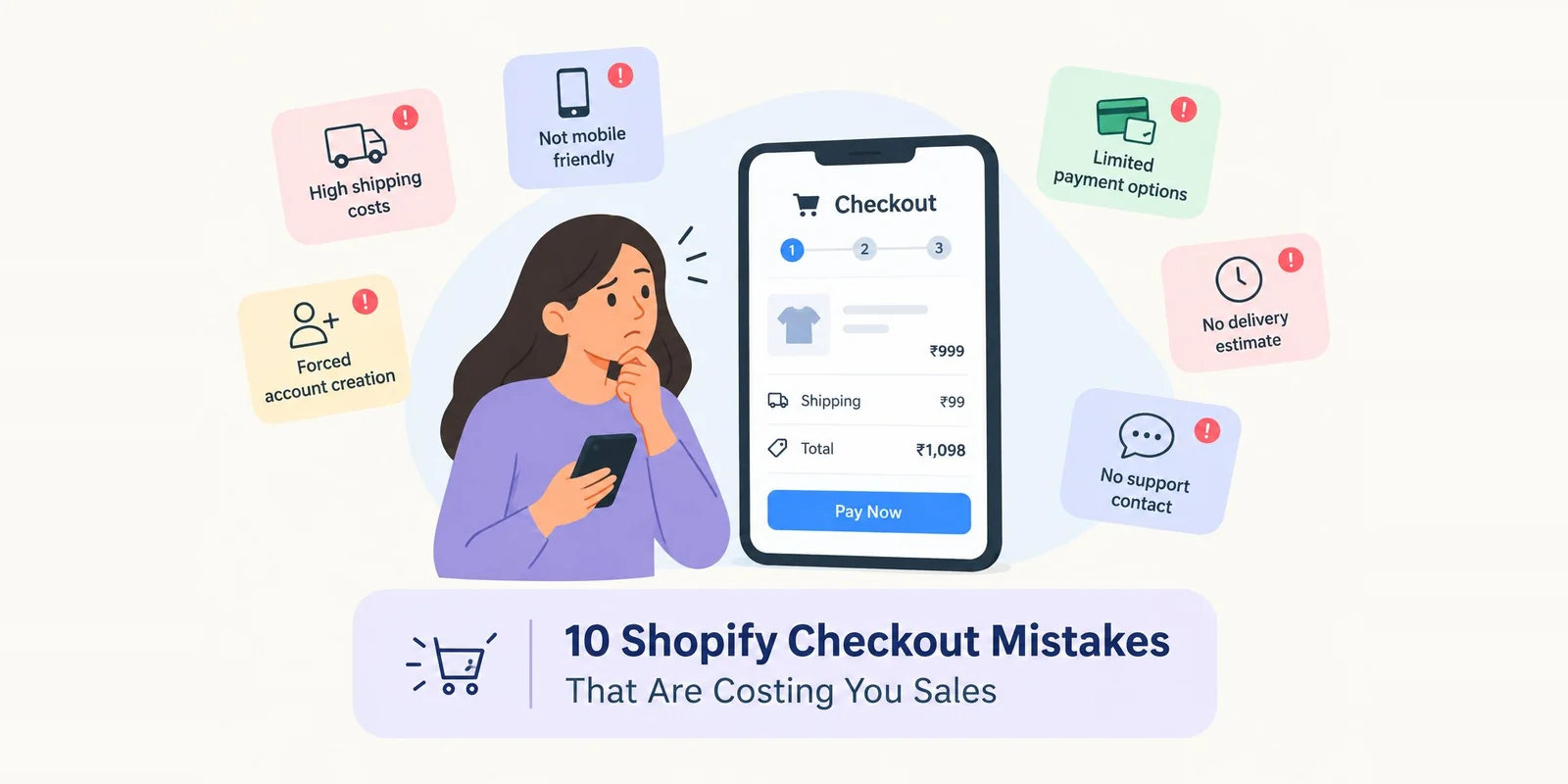
Here are 10 common Shopify checkout mistakes that could be costing your store sales, along with practical ways to address them.
1. Ignoring Mobile Checkout Optimization
Merchants often test their store on a desktop, unaware that most of their customers shop on a phone. Ringly reports mobile cart abandonment at around 80%, compared with 66.4% on desktop. Small buttons, poorly arranged fields, unclear instructions, and having to enter the same information repeatedly can make mobile checkout frustrating. According to the Baymard Institute US survey, long forms make it worse, because typing and editing on a phone is harder than using a keyboard. Effective mobile checkout optimization means making every step easy to complete on a smaller screen.
How to fix it: Test your complete checkout journey on an actual mobile device. Check that every field is easy to use and every step works smoothly. Use autofill wherever possible and remove unnecessary form fields wherever your Shopify setup allows.
2. Not Showing Clear Delivery Estimates Before Checkout
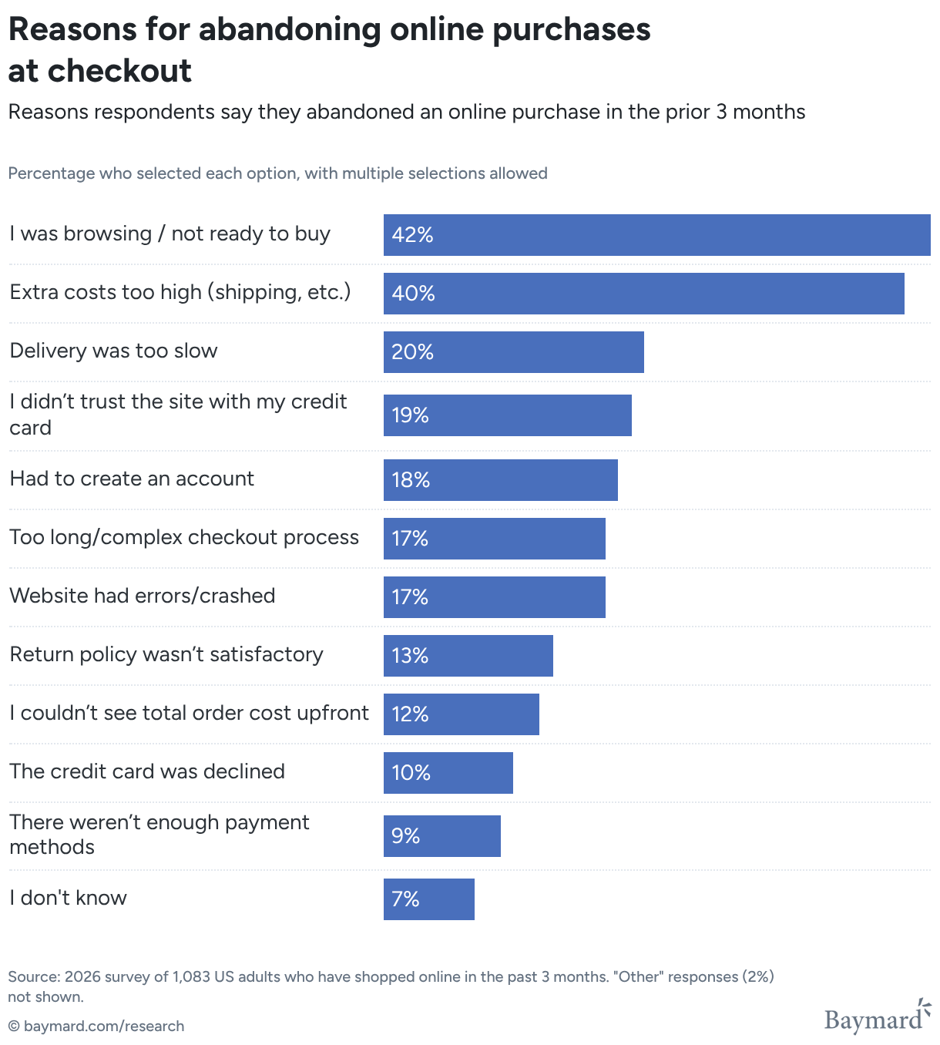
Many shoppers are eager to know when their order will arrive before they pay. If delivery information or an estimated delivery date is missing or unclear, shoppers may hesitate to place an order. In Baymard Institute’s 2026 survey, 20% of US online shoppers who abandoned their cart cited slow delivery as a reason. This highlights the importance of setting realistic delivery expectations before customers commit to buying.
How to fix it: Display estimated delivery dates on product pages wherever possible. Show shipping timelines and available delivery options in the cart or during checkout. Explain location-based restrictions and any potential delivery delays. Keep delivery estimates realistic and update them when circumstances change.
3. Making Checkout Long or Complicated
A checkout that is too long or complicated can cause customers to lose patience and negatively affect your checkout conversion rate. Asking for unnecessary information, repeating details already provided, or presenting confusing steps can make a simple purchase frustrating. Baymard reports that 17% of users who abandoned their carts cited a checkout process that was too long or complicated as a reason.
How to fix it: Ask only for the information necessary to complete the order. Enable address suggestions and browser autofill where available. The goal is to make every step feel simple and necessary.
4. Revealing Shipping Costs Too Late
Unexpected charges at the last moment are one of the biggest reasons customers abandon checkout. Baymard Institute reports that around 40% of surveyed US shoppers who abandoned a cart cited extra costs, such as shipping fees and taxes, as a reason.
How to fix it: One practical way to reduce cart abandonment is to make the total cost transparent before customers reach the final payment step. Display shipping fees, applicable taxes, and other charges during the checkout journey so shoppers can make an informed purchase decision without unexpected surprises. If you offer free shipping above a minimum order value, communicate that offer early and clearly.
5. Making Cart Changes Difficult During Checkout
Imagine a customer who wants to change a quantity or switch a size at the last moment. If making this change requires starting the buying process again, they may abandon the purchase altogether.
How to fix it: Let customers review and adjust their cart without losing their checkout progress. If supported by your Shopify plan and checkout setup, provide easy quantity and variant changes. If customers need to return to the cart to make edits, preserve their details and make it simple to resume checkout.
6. Requiring Sign-In Before Checkout
First-time buyers may not want to register, create a password, and verify an email just to purchase one product. Baymard Institute reports that 18% of surveyed US online shoppers who abandoned a cart cited being required to create an account as a reason.
How to fix it: Allow customers to check out without requiring an account. In Shopify, go to Settings → Checkout and find the Customer contact method section. Make sure “Require customers to sign in to their account before checkout” is turned off. Customers can then complete their purchase without being forced to sign in. You can encourage them to create an account after their order is complete.
7. Offering Limited Payment Options
A customer may be ready to buy, but if their preferred or trusted payment method is unavailable, they may leave without completing the purchase.
How to fix it: Offer payment methods that suit your target audience and business model. For Indian ecommerce stores, these may include UPI, debit and credit cards, digital wallets, and cash on delivery (COD), where appropriate. Make sure your payment options are clearly displayed, monitor failed transactions, and provide clear confirmation when a payment succeeds. Regularly reviewing payment performance can help you identify issues and make checkout easier for customers.
8. Applying the Same COD Rules to Every Order
Cash on delivery (COD) remains an important payment option for Indian ecommerce businesses. According to ShipPrime, COD accounts for an estimated 50% to 70% of Indian D2C orders, with RTO rates of around 25% to 30% for COD orders, compared with 2% to 3% for prepaid orders. These figures can vary depending on the product category, customer base, and delivery location. A first-time buyer placing a high-value order may present a different delivery risk from a repeat customer with a reliable order history, yet many stores treat them the same.
How to fix it: Offer COD strategically instead of treating every order the same. Look at order value, customer details and delivery history, and use confirmation messages or verification to catch issues before dispatch.
A COD RTO reduction strategy can include order confirmation, risk-based checks, and offering partial COD where supported. FlexyPe helps merchants improve checkout experiences with customer capture, incentives, and partial COD options. The goal is not just more orders, but higher-quality orders that work for both your customers and your business.
9. Letting Offers and Coupons Interrupt Checkout
A customer who is close to purchasing may respond to a useful incentive, but offers that interrupt checkout, like loud pop-ups or hard-to-find coupon boxes, pull shoppers away from paying. Relevant checkout incentives, such as free-shipping thresholds, discount codes, or product bundles, can encourage customers to complete a purchase. When planned carefully, these offers may also help increase average order value (AOV).
How to fix it: Keep your offers visible but quiet, so they never pull attention away from paying. Show a small progress indicator for a relevant incentive, such as ‘Add ₹200 more to unlock free shipping.’ Make the coupon field easy to use, with the code applying in one tap and the final price updating instantly. Make sure promotions are easy to understand and do not distract customers from completing checkout.
10. Leaving Customers Without Support During Checkout
A customer may have one unanswered question about sizing, delivery, returns, or payment. If they cannot quickly find assistance, they may leave the checkout rather than risk placing an order.
How to fix it: Accessible checkout customer support can help shoppers resolve questions about sizing, delivery timelines, payment issues, or order details before they leave. Provide a visible contact option, such as WhatsApp, email, or live chat, and ensure customers can get help without losing their progress.
Conclusion
Optimizing your Shopify checkout is essential to reducing cart abandonment and improving your store’s conversion rate. By eliminating hidden costs, simplifying forms, optimizing the mobile checkout experience, and offering trusted payment options, you can create a smoother buying journey. Regularly tracking checkout completion rates, payment failures, and COD returns helps you identify friction points and make data-driven improvements. For Indian D2C brands, the right checkout strategy can also help manage COD-related risks while improving customer convenience. With solutions like FlexyPe, merchants can explore smarter customer capture, checkout incentives, and flexible COD options. Ultimately, effective Shopify checkout optimization helps turn more shoppers into paying customers.
Frequently Asked Questions
1. Why is mobile checkout optimization important for ecommerce stores?
A difficult mobile checkout can cause customers to abandon their purchases. Test forms, buttons, address entry and payment on real mobile devices to make the process easier to complete.
2. How can I reduce return-to-origin (RTO) rates for COD orders?
Verify customer details, confirm orders before dispatch where appropriate, review customer and delivery history, and use suitable COD rules or prepaid incentives to reduce avoidable returns.
3. Is guest checkout better for ecommerce stores?
Guest checkout can reduce friction for customers who do not want to sign in before purchasing. Where possible, let customers complete an order without mandatory sign-in and offer account access as an optional convenience.
4. Which payment methods should an Indian ecommerce store offer?
Consider offering UPI, debit and credit cards, digital wallets and cash on delivery where supported and appropriate for your customers. Review actual customer preferences and monitor payment failures.
5. How can I make my Shopify checkout faster?
Remove unnecessary form fields, use address autofill where available, make delivery costs clear, and test the complete checkout and payment journey to identify avoidable steps.